Business Problem
Enable the customers to reach Customer Support on the go.
Why?
- Customers seek instant support for the problems that they face
- The CRM systems need to be supported with stronger, efficient and portable help desk system
- So that the customers can seamlessly and comfortably reach out to the support staff
What?
- Building a White Labeled, Portable Helpdesk
- The solution is to build a white labelled portable helpdesk for the customers, which will be integrated within the service offerings
How?
Deriving a Solution through a User Centered Innovation Strategy.

Discover
Ask
Discover and identify all the stakeholders i.e. Users, Customers and Partners and ask them relevant questions to reveal their needs and desires from the system.
Questions for Business Stakeholders
- How do you plan to ship this tool?
- Who are your Customer and Users?
- Have you tried any other solution before?
- Can you narrate your experience with those solutions?
- Can you explain the macro level expectations from this tool?
Questions for Users / Consumers
- How has your experience been so far with Help-Desk / Customer Support?
- Are you comfortable with Chatbots?
- What is the most crucial situation when you wish to connect with a human support executive?
- What do you think, who are smarter Humans or Chatbots?
- What has been your most frustrating experience while dealing with Customer Support?
Brainstorm
Based on the responses and pain points gathered from the users, customers and business stakeholders, it’s now time to brainstorm over the findings among the team.
Questions that arise through brainstorming
- Doesn’t this tool appear to be a sort of module or plugin to be independent of any architecture?
- Have we ever done similar thing in the past? If yes, what and how?
- This tool will have to be made portable on all possible platforms, is’nt it?
- What is the typical tech stack that we prefer for such tool?
- Don’t we need to consider specially abled users, as this will be catering to wide range of end users?
- What are the chances that we will need to integrate device specific voice assistance to the tool?
- Does the client have budget for all the bells and whistles that we are dreaming of?
Analyze
Post brainstorming it’s time to analyze all the findings and research artefacts to derive qualtitative and quantitative data for further understanding.
Quantitative and Qualitative Analytical findings arising post brainstorming
- We need to identify the different users from business as well as customer side
- There seem to be 30% users who are senior citizens and around 10% are specially abled
- Out of specially abled there are 3% visually challenged and 5% have voice and hearing challenges, while 2% are physically challenged
- There are some users who are still on older Operating Systems. Somewhere around 8%
- We found 30% of users accessing the client’s tools through native app, while 70% access through browser
- Only 10% of users got their issue resolved through Chatbots, rest everyone ended up requesting for human executive
- The existing Chatbots are irritating as per many users, as they throw useless options rather than actually helping
Research
It’s now the time to begin our research to derive the solution. Defining the persona and identifying the pain points are some of the crucial activities in this stage. However, Persona are not to be confused with User Roles. Rather for every role, there can be multiple persona based on the permutations and combinations of different traits. Every persona is a representation of a group of segmented users with common traits. That’s the reason why persona are not real users but representation of multiple similar users.
In our use case we have two set of persona which are, the Business Users and the Consumers.
Business Users

Bruce Banner - Head of CRM Team
Male falling in age range of 40 to 50
- I am constantly busy and rarely use my Laptop
- My major business activities are handled on my Smartphone and Tablet
- I have delegates who perform paperwork on my behalf
- If you have something for my attention, better send it to my Mobile Devices

Twilight Sparkle - Support Executive
Female falling in age range of 20 to 35
- What I ask is simple
- Tell me the problems which I am supposed to solve
- I handle Loans
- Don’t bug me by asking, why haven’t you received the paycheck for your medical bills
- That’s not my cup of tea

Mary Jane - Support Supervisor
Female falling in age range of 25 to 35
- I am responsible for assigning right tickets to right executive in a rush hour
- I hate scrambled and unorganized stack of problems awaiting my attention
- They waste my time with unnecessary efforts in re-arranging them
- Just to spoon feed the support team

Tom Andrews - Admin Staff
Male falling in age range of 30 to 40
- I like striking balance between my work and leisure
- I like learning new stuff, but hate if it needs me to strain my brain
- I like Jigsaws, but not giant ones
- So better give me a cockpit, that does not annoy me
Consumers or End Users

Steve Parker - Student, busy with multiple activities
Male falling in age range of 18 to 20
- I have already told you my problem
- Just solve it and don’t just waste my time asking me the same questions in different forms
- My answer will not change
- Why don’t you just note down what I mentioned?

Reena Anderson - Student and Part-Time Choreographer
Female falling in age range of 18 to 20
- I am not an average student, who has plenty of time to hang out
- I am the best-in-town choreographer, and too busy with my dance moves, when I am not studying
- I need to manage my time, and so hate waiting for solutions
- Don’t keep me waiting

Rebecca Petherick - Homemaker & Social Worker
Female falling in age range of 35 to 40
- I am happy-go-lucky homemaker, busy taking care of my family and neighborhood
- I am not cranky, but don’t just try to test my patience by throwing your crappy excuses
- I am not a fool
- So don’t just waste my time and give me what I asked for – A Solution

Jake Duffy - Visually Challenged self employed musician
Male falling in age range of 50 to 80
- I cannot see, so don’t expect me to fill forms just to get my problems solved
- I cannot read, and am too impatient to type, after hearing the screen reader dictate each and every letter
- Give me something that will help me easily and conveniently express my difficulties
Understand
It’s now time to understand the research findings. After deriving the persona, determining their pain points, we shall now try to empathize with them, and understand the root cause of their pain points to derive a solution for them.
Empathizing with the Persona
Now it’s time for getting into the shoes of users to understand their pain-points. While doing so, it’s very crucial to feel their pain as if you are in their position. Empathizing should not be mistaken with sympathizing, as when you sympathize, you feel pity and sorry for that person, unlike when you empathize, you are feeling their pain and try to find a solution to get rid of it.

Bruce Banner - Head of CRM Team
- Extensive use of Smart Mobile Devices
- Have delegates for paperwork

Twilight Sparkle - Support Executive
- Handles issues related to particular area
- Doesn’t want to be bugged with irrelevant issues

Mary Jane - Support Supervisor
- Assign right tickets to right executives during rush hour
- Hates wasting time on scrambled and unorganized tickets

Tom Andrews - Admin Staff
- Wants to have proper Work-Life balance
- Hates unnecessary complexities that waste quality time

Steve Parker - Student, busy with multiple activities
- Doesn’t have time and patience to repeat issues
- Wants his answer to be stored for reuse

Reena Anderson - Student and Part-Time Choreographer
- Is too busy with her studies and part-time work
- Hates waiting for longer time to get resolution for her issues

Rebecca Petherick - Homemaker & Social Worker
- Hates wasting time on unnecessary questions
- Wants a solution without testing her patience

Jake Duffy - Visually Challenged self employed musician
- Is visually challenged and so hates complicated forms
- Needs assistive technology to help him easily report his problems
Probable solution for the pain points
Now that we have empathized with the users, let’s try to understand what could be causing the pain points so that we can determine a probable solution for further brainstorming with the business stakeholders and the execution team.
Bruce Banner - Head of CRM Team
- Mobile Compatible Dashboards and Reports
- Support for Delegating the Workflows and certain Management Activities
Twilight Sparkle - Support Executive
- Filtered list of relevant support tickets
- Ability to re-assign wrongly allocated support tickets back to supervisor
Mary Jane - Support Supervisor
- AI driven categorization and sorting of tickets
- AI assisted workflows for assigning right ticket to right executive
Tom Andrews - Admin Staff
- Easy to understand and configure Dashboards & Reports
- Easy to use and understand User Interfaces for seamless Interactions and Flows
Steve Parker - Student, busy with multiple activities
- Simplify the process of reporting the problems
- Enable easy way of maintaining Traceability of issues
Reena Anderson - Student and Part-Time Choreographer
- Simplify the process of reporting the problems
- Maintain an optimized and efficient ETA
Rebecca Petherick - Homemaker & Social Worker
- Simplify the process of reporting the problems
- Simplify the User Interface for quickly and easily reaching the Support Team
Jake Duffy - Visually Challenged self employed musician
- Voice Enabled solution for reporting the issue
- Integration with Voice Support Services like Alexa, SIRI, Cortona, etc.
Deriving Feature Map
Now that we have progressed with the User Research, it’s time to develop a feature map based on the derived business and user requirements during the research phase. This exercise isn’t performed in silo, rather all the team members including Product Owners / Business Analysts, UX SMEs, Solution Architects and QA professionals come together to brainstorm and derive the features, functionalities and even modules so that even the feasibility perspective can be determined. The image below is the snapshot of this feature map.

Deriving User Journey
Post defining the Feature map, every team member from different functions go ahead and start building their own understanding artefacts like Requirement Documents, Solution Architecture, Overall Test Plan, etc.
The Product Leadership Team goes ahead and defines the MVP plan along with the scope of work. It is when the UX SME will be assigned a functionality or a module to come up with the designs. However, instead of immediately begining to work on wireframes, the most crucial stage is to define User Journeys to understand all the possible ways which the Users can access that particular module or perform the functionality. Now there might be possibility of multiple ways, in which the users can perform that particular functionality, or access that module.
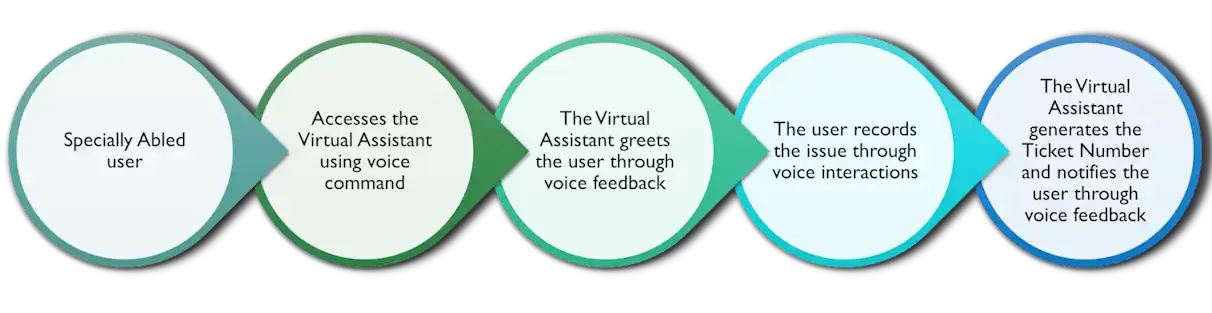
In this example, considering that this White labeled Pocket Helpdesk application is integrated in a “Plant Care” app, the user is trying to reach out to the support team. Now this is just one path as an example, the UX SME needs to determine all the possible paths which a user can attempt, including the negative (or malicious ones) so that every aspect of user behaviour can be captured to avoid post delivery disasters. So to ensure that we dont leave even users like Jake who is visually challenged, we have derived a voice driven support journey, to ensure that we even consider his pain point.
A simple User Journey to reach out to Customer Support considering one scenario

A simple User Journey for Voice Driven Ticket Generation
Detailed Interaction Flows
While the user journeys provide a macro level pathway of user’s actions, they need to be expanded into a detailed interaction flow which provides more clarity in terms of conditional logic and feasibilty. The interaction flow although is designed by a UX SME, it needs to be brainstormed further with the team so as to determine these details:
- Inputs for Requirement / Specification Document and User Stories
- Feasibility challenges and their workarounds
- Security risks arising out of negative user behaviour
- Compliance or Regulatory requirements (if any) to be considered
- The different UI screens and components which will be needed to be built as part of design stage
This image shows an example of detailed interaction flow derived from the simple User Journey of customer trying to reach the Customer suppport. The image being vast appears timy, but you can click (or tap) the image to view it’s zoomed version. And if you want to view some more flows you can check out here.

Design
With the foundation in place, it’s time to begin sketching low-fidelity wireframes and designing screen visuals. While I won’t be sharing prototypes here, since you are already well-versed in wireframing and UI design, there’s one crucial element I must highlight, which is empathy. It’s often overlooked, yet it’s what transforms a functional interface into a truly human experience.
Reflecting Empathy Through User Interfaces
This screen flow demonstrates how replacing generic messages and captions can significantly shift a user’s perception. It’s the kind of thoughtful nuance, that for now, only humans tend to consider. This example highlights the contrast between AI-driven and human-centered approaches to designing intuitive and empathetic user interfaces.

01 – Reflecting User Context

02 – Triggering User’s Emotions
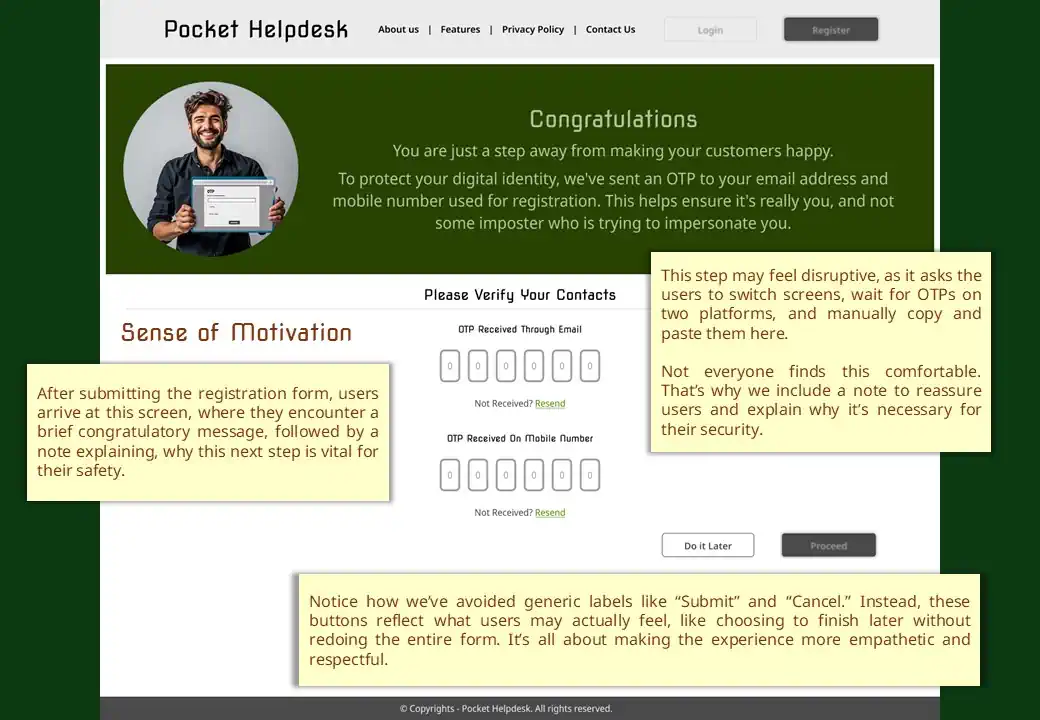
03 – Sense of Motivation

04 – Handholding Experience
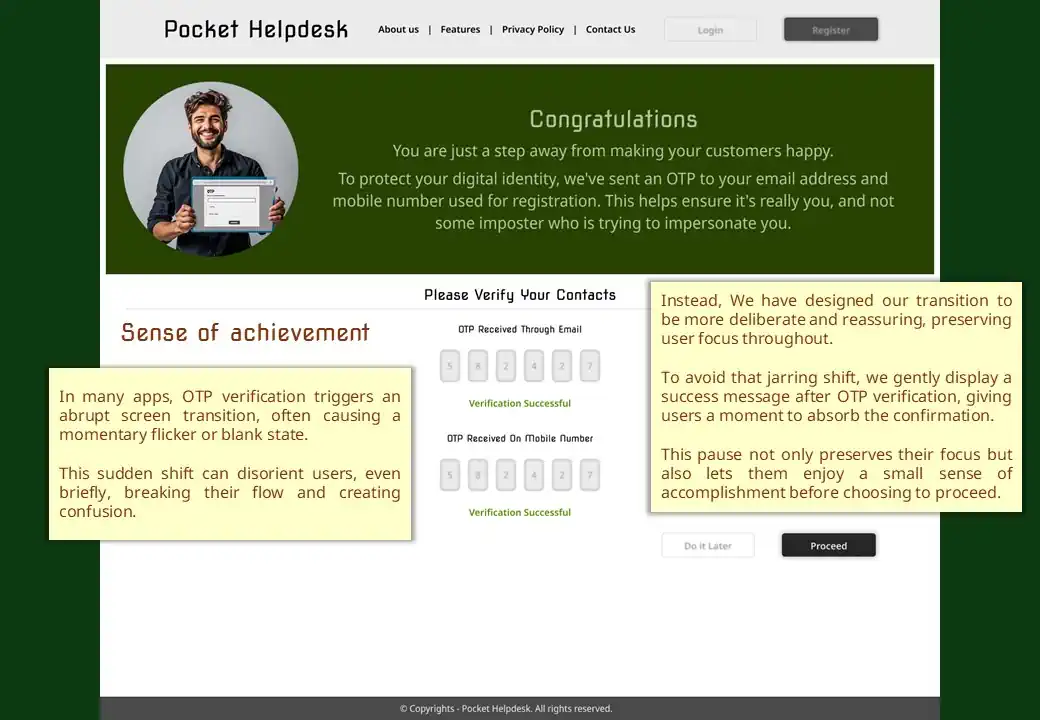
05 – Sense of achievement

06 – Acknowledging the decision
Design Systems
The important part, with which most of the designers are still confused with, is the Design System. Let me briefly explain what a design system is.Design Systems are the backbone of entire Frontend layer. Before we dive deep into a Design System, lets consider some myths around them:
- Design Systems are only associated with the aesthetic part of the Frontend
- It’s the responsibility and accountability of the design team to build the Design System
- Developers have no role in deciding the components of a design system and they should just follow the approved designs
- Design Systems are optional
Very few are aware of these facts about Design Systems:
- A Design System is not only related to aesthetics but also the business logic of fetching data and content from the business layer
- It’s the responsibility and accountability of Branding, UX and Engineering team
- The Branding team is responsible to provide the latest and updated branding style guide to be followed for designing the components and visual elements, and once they are designed, the Branding team is accountable to ensure that the Design System is compliant with the Brand Guidelines
- The Designers are responsible to design the visual elements as well as the UI Components and ensure that they follow the Brand Guidelines, also they are accountable to ensure that the components are following the standard technical specifications of the host platform and the technology stack, which is shared by the Engineering team
- The Engineering team is responsible for converting those designs into actual reusable Component Library, which might be re-used in multiple projects
- That is the reason why a Design System is also to be considered as a sub-project to be built before the real development work begins
Third Party Design Systems
This is also a fact that not every time a Design System can be built from scratch. For example, if the team is running out of time and cannot invest time and efforts in building a Design System from scratch, then readily available Design Systems can be used. Although they come with an inconvenience of compatibility limitations with the branding style guide. Thoose Design Systems come with their own generic color themes, typographies and business logic which are more rigid to be modified as compared to those built in-house. Based on the situation and urgency, the team can decide to select a third party design system. However it will come with additional load on the Design Team to design the components from scratch in their design tool, if the vendor of the design system doesn’t provide a Design Tool’s Component Library too along with the Developer’s Kit.
These are some of the third party Design Systems available for you to use:
- Material Design: As you are aware of, that’s the Design System introduced by Google for native Android platform https://m3.material.io/ but later it got adapted to web platforms too such as MUI React Component Library https://mui.com/material-ui/
- Fluent Design System: Introduced by Microsoft for not only building native Windows Apps https://learn.microsoft.com/en-us/windows/apps/design/ but also web applications https://developer.microsoft.com/en-us/fluentui#/
- Apple’s Human Interface Guidelines: Needless to say that Apple too has it’s own design system for building iOS Apps https://developer.apple.com/design/human-interface-guidelines
- Other Design Systems: There are many Design Systems available in the market which you can use as per your product’s requirements. Have a glance at them at https://www.designrush.com/best-designs/websites/trends/design-system-examples
Usability Testing
Usability Testing (some also call it as UI/UX Testing) which is often (well mostly) confused as User Acceptance Testing (UAT). The prime difference is that Usability Testing is a pre-production activity which occurs as part of design stage to ensure that the Screens and Interfaces will be comfortable and user-friendly for users. Unlike UAT which occurs post production where Testers test the finished product to ensure it’s bug free and safe to be released to the customers.
Usability Testing is performed over Wireframes and Final Visual Designs, where the testing is performed by everyone including the closed group of potential users, who were involved in User Research stage.
Usability Testing on Wireframes
Even before the wireframes can be approved and frozen for building the aesthetically rich screen visuals, the low fidelity (or Black & White as some call them) wireframes are stitched together to build an interactive design prototype and showed to the Users to use them as if they are using the real application. Based on their inputs and feedback, alternate approaches are re-designed based on different permutations and combinations, and the users are asked to retest different options. We also call this as A/B Testing where A is one option, B is another option. However there can be multiple options. While doing this a technical feasibility is also confirmed by the Engineering team to ensure what is design can actually be built with less challenges and defects.
Usability Testing on Real-looking Screen Visuals
Once the final wireframes are approved and cleared for building the real visually aesthetic screens, the team needs to again run the Usability testing with the users and the team over the Real-looking Screen Visual Prototypes. This is necessary to identify:
- Whether the visual elements comply with the Branding Guidelines
- Are their any accessibility, compliance or regulatory issues in terms of colors, component dimensions, typography, contrast ratio and most important, the text and phrases used in the design, also called as UX Copy
- Are the screens covering all the scenarios upto micro-level interactions or missing any flow (this condition is primarily checked during the testing over wireframes)
Once all the conditions are satisfied, the final designs are approved and frozen for the Engineering team to start working on them during their Dev Sprints.
That's all
Hope you got the gist of practical execution of UX Strategy through effective collaboration with the team, rather than working in Silos. Feel free to contact me with your doubts or queries. You can even connect with me on LinkedIn.